PDF Submission
A brief guide on how to typeset and submit PDFs with OBP specifications
Table of Contents
-
- Microsoft Word
- InDesign
- Classical Text Editor
- LaTeX
-
- Microsoft Word
- InDesign
- Classical Text Editor
- LaTeX
Typesetting
OBP books usually come in royal octavo size (6.14" x 9.21", or 156 x 234 mm).
Margins are:
- top: 3cm
- inner margin: 2.5cm
- bottom: 2cm
- outer margin: 2cm
Fonts are:
- TeX Gyre Pagella for body text
- Californian FB for titles
- For text using a non-Latin script, please use Noto Serif font families. However, for Arabic text, please use Scheherazade New instead.
Logos are available at this address
Typeset in LaTeX
Click here to download a LaTeX template with our layout/formatting requirements.
Fonts
Body text is set in TeX Gyre Pagella included in the TeX Gyre font bundle.
| Font | "fontpackagename" | "fontcode" |
|---|---|---|
| TeX Gyre Pagella | tgpagella | qpl |
\documentclass{article}

\usepackage{tgpagella}

\begin{document}

{\fontfamily{qpl}\selectfont
This text is set in TeX Gyre Pagella.
}
\end{document}
Titles are set in Californian FB. This is a commercial font; if you are unable to use it for copyright issues, it's OK to set titles in TeX Gyre Pagella.
Page Geometry
\usepackage[paperwidth=156mm,
            paperheight=234mm,
            top=2.5cm,
            left=2.5cm,
            bottom=2cm,
            right=1.5cm,
            foot=0cm,
            marginparsep=0cm,
            marginparwidth=0cm,
            layoutheight=23.4cm,
            layoutwidth=15.6cm,
            headsep=1cm]{geometry}
PDF Submission
To guarantee the printed / online editions of your book to look the same as what you see on your computer screen, we require you to send us a PDF which complies with the PDF/A standards.
PDF/A is an ISO-standardized version of the Portable Document Format (PDF) specialized for use in the archiving and long-term preservation of electronic documents.
PDF/A differs from PDF by prohibiting features unsuitable for long-term archiving, such as font linking (as opposed to font embedding) and encryption. The ISO requirements for PDF/A file viewers include colour management guidelines, support for embedded fonts, and a user interface for reading embedded annotations.
Source Wikipedia
PDF from Microsoft Word
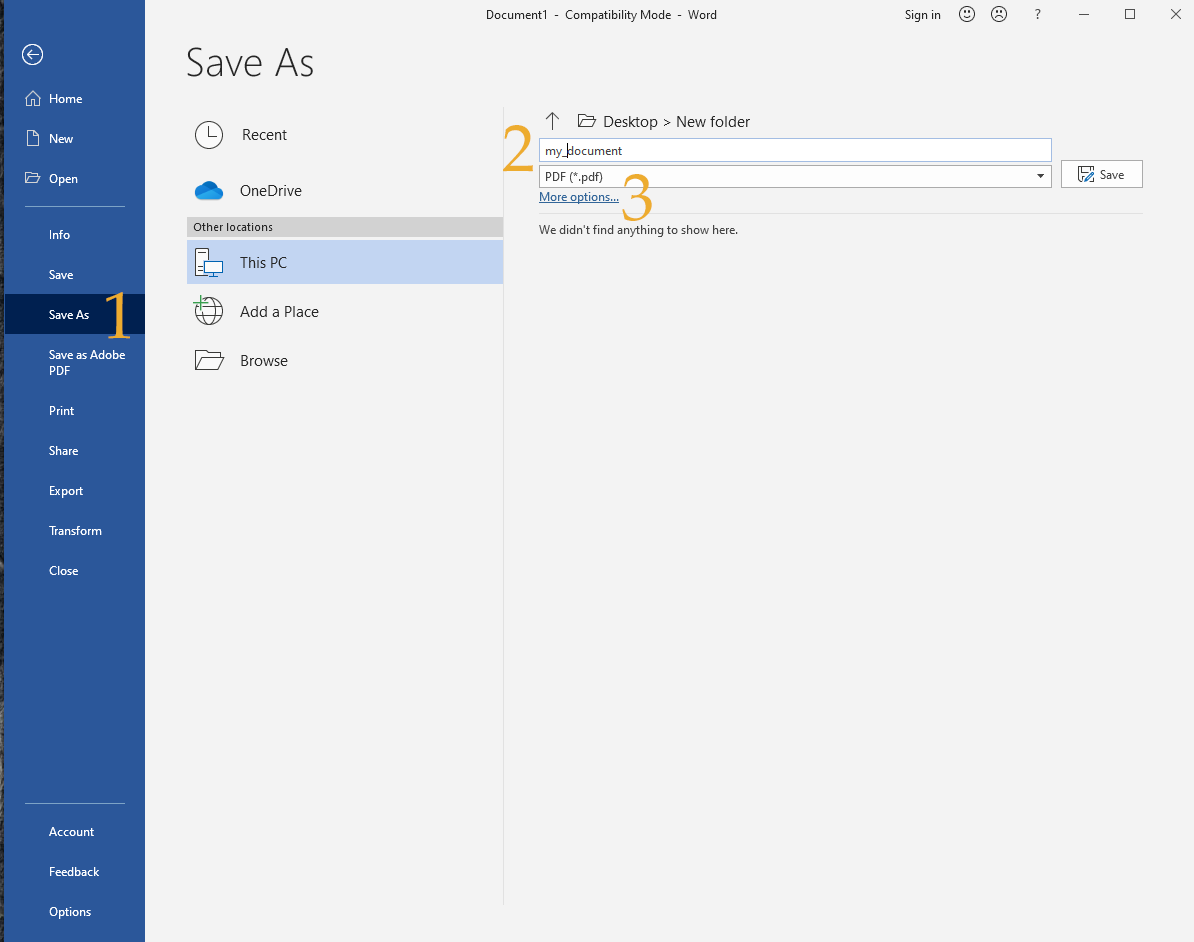
Open your manuscript in Microsoft Word and click on File > Save as (marked as 1). Input a name for you document and choose .pdf from the drop down menu (marked as 2). Lastly click on more options (marked as 3)
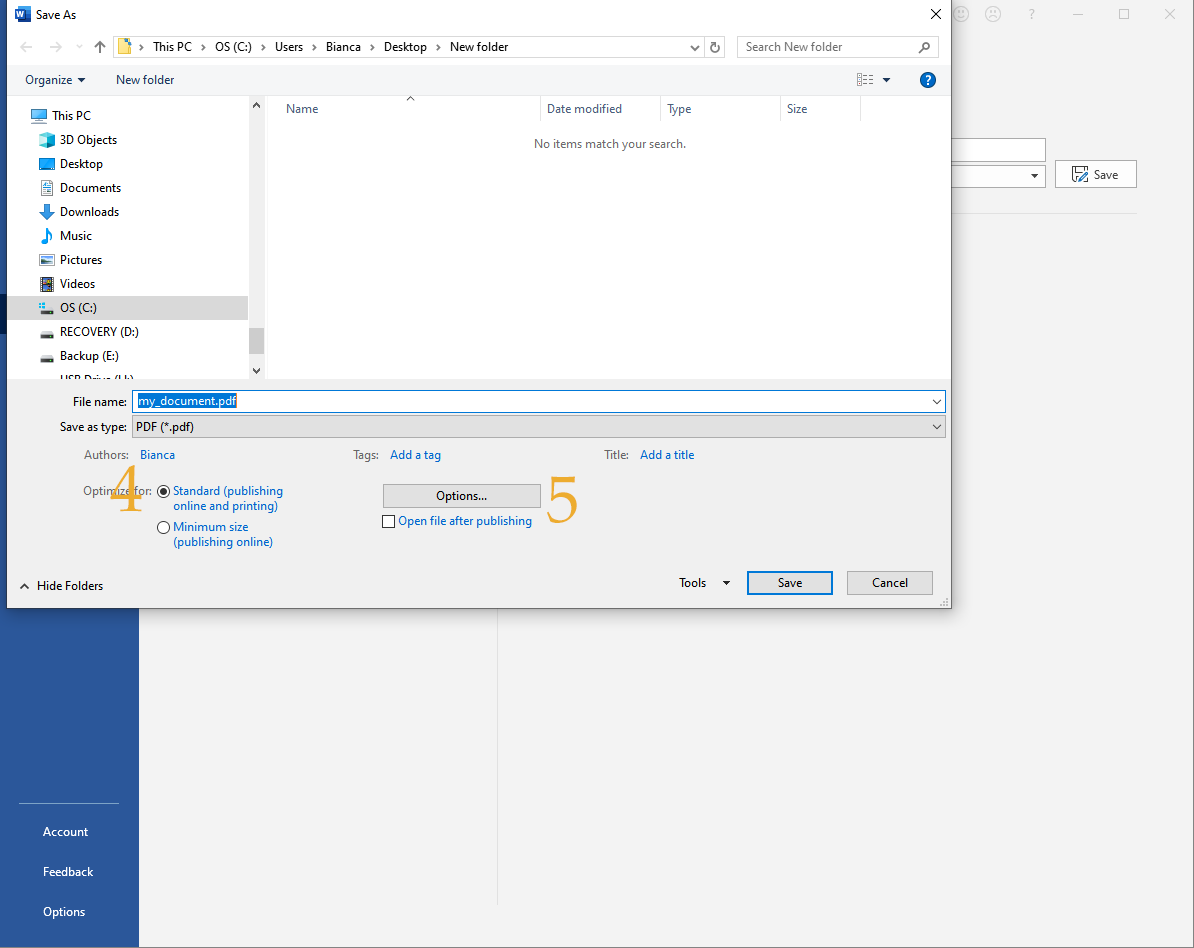
Make sure that the document is being optimised for print (mark 4) and click on the Options... button (mark 5).
Fill the export detail as displayed.
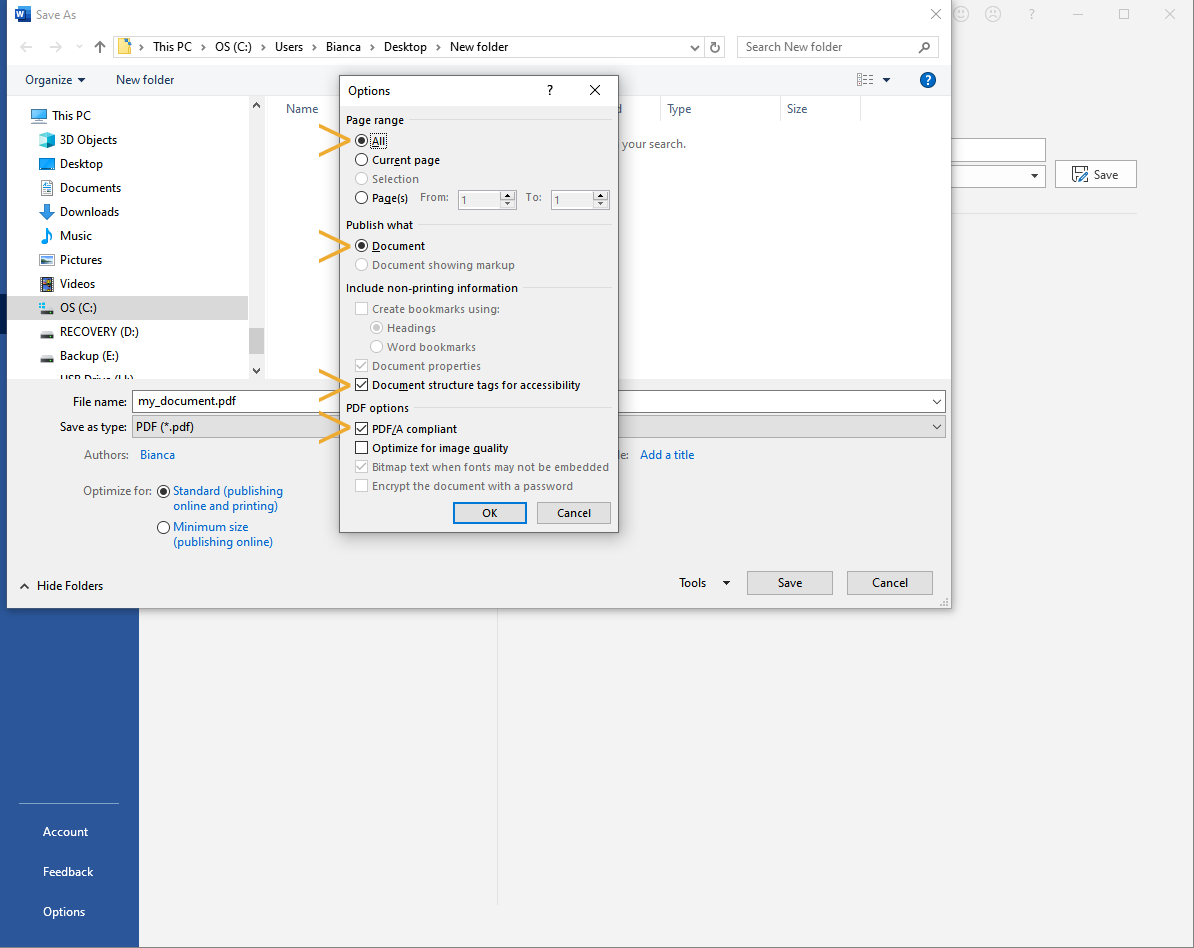
Clicking on OK and then Save should produce the PDF under the desired filename.
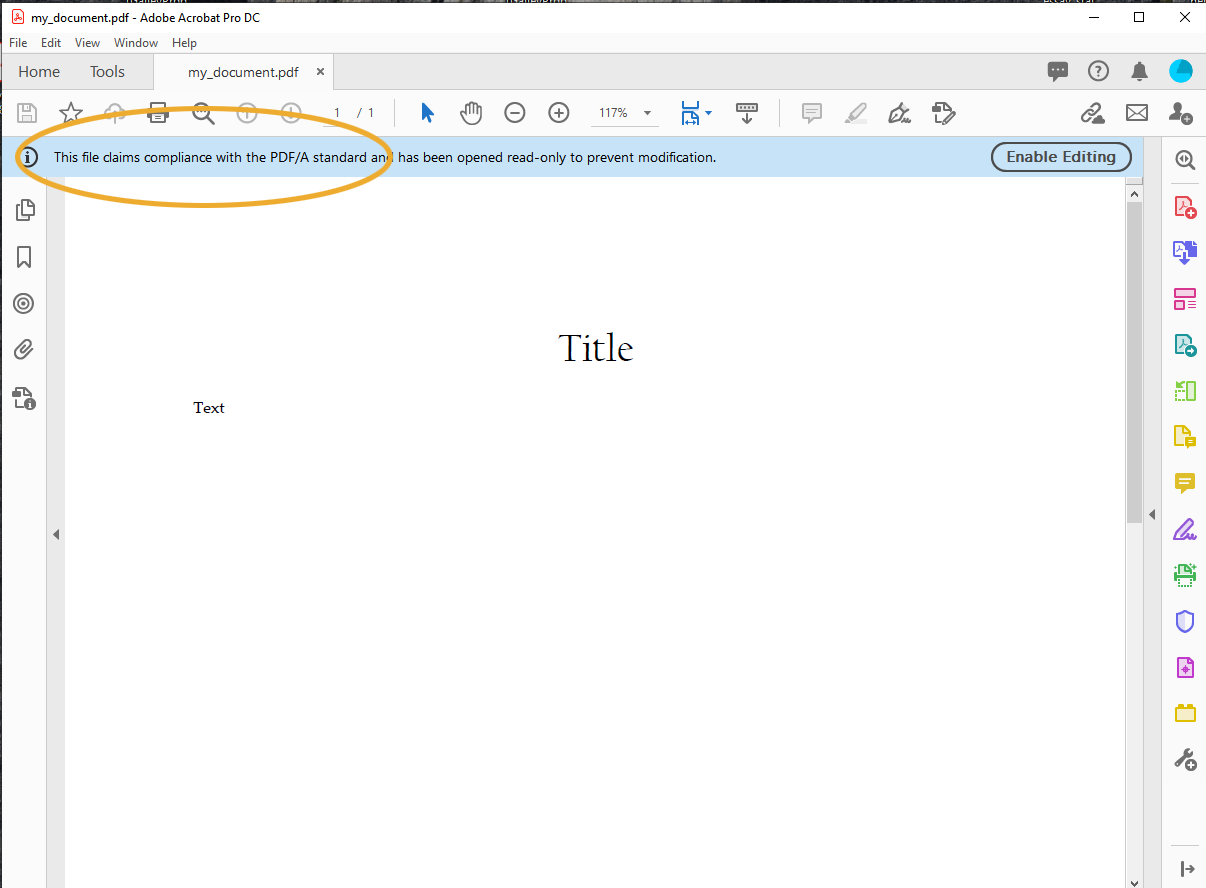
To check the PDF/A standard compliance, at this stage is enough to open the PDF in Acrobat and check the message in the blue ribbon at the top of the window.
PDF from Classical Text Editor
We faced a number of (technical) issues with the PDFs produced directly from CTE, so we ask our authors to:
- export their books in postscript and then
- get a PDF from it via Acrobat Distiller (or, if preferred, Ghostscript).
Suggested settings for the Poscript (virtual) printer are:
- chose the appropriate printer (Acrobat)
- check the box ‘Print to File’
- click ‘Options’ and check the box black and white (colour will always produce RGB in the Postscript file)
- in the same window click 'Advanced' and make the following adjustments: set Print quality to 2400dpi;
- set True Type Font to: Load Soft Font to Printer;
- under Postscript Options set to: optimize for portability.
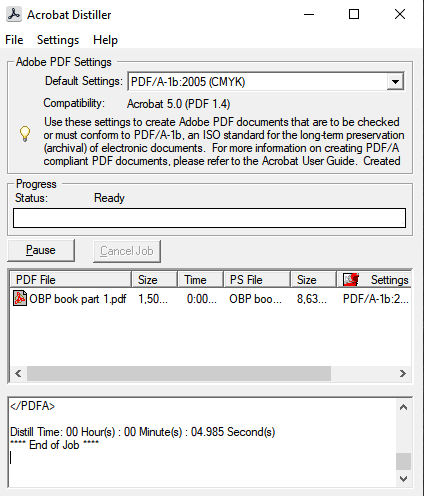
Conversion with Acrobat Distiller
Once the poscript file has been produced, open the Acrobat Distiller, select the PDF/A profile and drag and drop the poscript file.
Conversion with Ghostscript
We have got good results with this command:
gs -dPDFA -dBATCH -dNOPAUSE \
   -sProcessColorModel=DeviceCMYK -sDEVICE=pdfwrite -sPDFACompatibilityPolicy=1 \
   -sOutputFile=output-file.pdf input-file.ps
General Guidelines
- At the front of the book, please insert the two title pages (with a blank page in between) and copyright page provided by your proofreader/editor. These pages should count towards the numbering of the first numbered page. For an example of the layout of these pages, please see https://books.openbookpublishers.com/10.11647/obp.0431.pdf. At the back of the book, please insert the “About the Team” page provided by your proofreader/editor.
- Running titles should be positioned 1.25cm from the top margin and centre-aligned. The book title should be used as the running title for left-hand pages and the chapter title for right-hand pages. Page numbers should be positioned in the outer upper corners of pages, in line with the running title and outer margin.
- Please ensure that a consistent, reader-friendly presentation and referencing style (e.g. MHRA, APA, Harvard etc.) is followed throughout your manuscript. If you prefer, you can follow our in-house style guide, as outlined on pp. 14–23: https://cdn.openbookpublishers.com/OBP_Author_guide_db7e369687.pdf. Please also adhere to the following:
- Ensure that all links are still active when you submit your manuscript to us. Please do not include a ‘last accessed’ date; this is unnecessary since we archive all external links at the time of publication via the Internet Archive Wayback Machine (https://archive.org/web).
- Provide DOIs (Digital Object Identifiers) for all works, whenever available (typically for books and articles published after the year 2000). Crossref provides a useful tool to discover DOIs available at: http://search.crossref.org. Please display DOIs in this way: https://doi.org/10.1016/S1097-2765(03)00225-9. Please provide URLs for all resources that are freely available to read online. Please do not include links to resources that are not freely accessible to all users, e.g. JSTOR, and please make sure all links are active.
- If you are including images/figures in your book, please ensure that images as sized appropriately for their pixel count/resolution:
- Full-page images (including the cover image) should be approx. 3200 x 2500 pixels.
- Half-page images should be at least 2100 x 1700 pixels.
- Smaller images should be at least 1400 x 1000 pixels.
- To calculate the maximum size each image can be printed, divide the height and the width in pixel by 300 (the minimum dot/pixel density required for printing).
- Captions for figures/illustrations should include the following information: figure number, photographer/artist, title, date, place where the artwork/manuscript is held (if relevant) and copyright or license statement. E.g.
- Fig. 1 Jean-Antoine Watteau, Pilgrimage to Cythera (1719), Charlottenburg Palace, Berlin. © Palace Museum.
- Please bear in mind that most images found online cannot be reused freely. Unless they are licensed under Creative Commons (e.g. on Wikimedia Commons) you must obtain reuse permission. If you plan to include any images in your publication, please read carefully the Information on Images included in our author’s guide (https://www.openbookpublishers.com/information-for-new-authors)
- We expect camera-ready pdfs to include alt text (which can be added using Adobe Acrobat): if you need guidance/instructions on doing so, please contact us. The alt text should be added to the final PDF after all editorial corrections have been made.
- Facing pages must be the same length. To facilitate the correction of page make-up problems, you can occasionally run a pair of facing pages one line long or one line short, but the difference between two consecutive spreads should never be more than one line (i.e., don't run one double-page spread one line long and follow that with a spread that is one line short).
- If necessary, insert blank pages between chapters to ensure that each new chapter begins on the right-hand page of a spread. Please do not include page numbers or running titles on these pages, nor on the first page of each chapter.
- Break heads evenly to avoid awkward-looking turnovers-especially turnovers that are just one word.
- Do not end a page with a heading or a box title; there must be at least two lines of text following these elements at the bottom of a page.
- Avoid running the last line of a paragraph to the top of a page by itself; try to force at least two lines to the next page. However, leaving a single short line at the top of a page is acceptable in the one case where it leads directly into a display equation.
- Make sure that the spacing around all elements (above, below, indents, etc.) to the text or to other elements remains consistent throughout, i.e. from the figure legend to the text and the figure to the descriptive material in the figure, keep the spacing consistent throughout the book.
- Please ensure that all fonts in the book are free to use commercially, and that they are all embedded in the PDF. This can be checked in File > Document properties > Fonts. We recommend using our standard font, TeX Gyre Pagella, for body text.
- Please make sure the colour contrast ratio between text and background is at least 4.5 : 1, or 3 : 1 for 'large' text. To count as 'large', text must be 18+pt regular or italic, or 14+pt bold or bold italic. Contrast ratio can be checked here: https://color.adobe.com/create/color-contrast-analyzer
- Three editions of the book can be created: PDF, paperback, and hardback. For the PDF edition, please produce a separate PDF with the same text block width but with outer and inner margins of the same size, i.e. text block centred on the page. Please produce this edition after all editorial corrections have been made.